Environment Hazards & Kill Triggers
Environmental hazards are key elements that can inflict damage on the player or AI, adding a layer of complexity and challenge to your game. Frequently, these hazards also trigger visual or audio effects, providing crucial feedback to the player.
Add a Hazard to Your Map
-
Add a brush that is the size of your lava pit. Change the surface material to a lava material such as:
ca_p/mp_env/mp_ca_sacrilegious_lava_plane.infoThis part isn't strictly required, but does provide an important visual cue to the player.
-
Directly above that brush, add a kill trigger: New Entity → Triggers → Kill → Lava.
tipIf you want the kill trigger to kill AI as well as players, set the aiCanActivate flag in the Entity Inspector.
-
Directly above the kill trigger, add a lava environment hazard: New Entity → envhazard → Volumes → Lava.
You should now have a delicious death sandwich (as shown below) made up of:
- An environment hazard (A).
- A kill trigger (B).
- A brush with lava material (C).
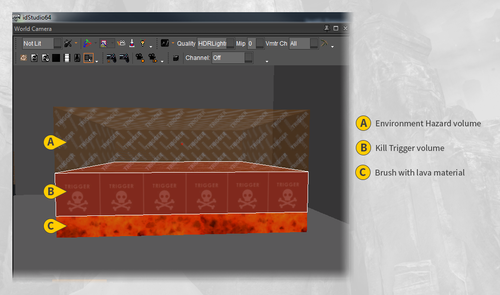
Anything that steps on the lava material brush will be killed by the kill trigger and will experience the lava effects from the environment hazard.