Entity Inspector
The Entity Inspector is an essential tool that displays all the properties of a selected entity in the viewport.
It provides a comprehensive overview of the entity's information, utilities, and functions specific to the entity. The Entity Inspector allows you to view all the editable properties for the selected entity and provides quick access to additional editing functionality based on the entity's type. Additionally, the Entity Inspector enables you to view the materials used by the selected entity and easily open them for editing.
For any workflow that involves modifying an entity, the Entity Inspector is a must-use tool.
Entity Inspector Interface
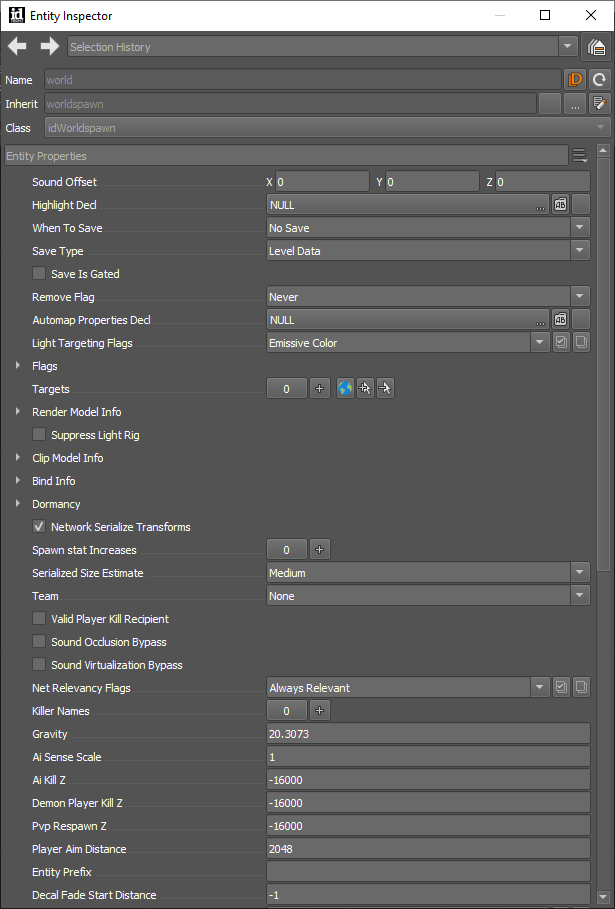
Entity Inspector Toolbar
| Item | Description/Use |
|---|---|
| Entity Name | - Name of the entity in the map. |
| Open in Logic Designer | - Opens logic graph associated with logic entities. - Useful in maps with logic steps. |
| Reload Entity in the Running Game | - Sync an entity from the World Editor directly into the game. - See if it behaves as you’d expect. - Quickly check your changes. |
| Inherit Line | - Tells you entityDef (entity archetype) that the entity is using to create an instance in the game. - Button next to Inherit Line opens the entityDef in Decl Editor (base properties of the archetype). |
Changes to the entityDef will only display on new instances of the entity, or on existing instances that relied on the base entityDef.
Any instances in your map that already override the base entityDef (changes made in the Entity Inspector) will not follow new changes to the entityDef.
- Entity Inspector describes the properties of the instance in the game (only stores the differences between the entityDef and the instance – so if no changes are made, the only stored info is the map position).
World Spawn Entity
Properties of the entity:
- Default world entity.
- Special entity that contains global world settings.
- Always exists.
- Set up how the sky renders.
- Set up environment settings.