Decls and Implementation
AutomapProperties Decls
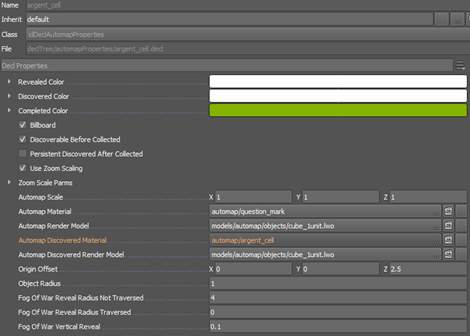
Each entity represented on the Automap has its own automapProperty decl assigned on the EntityDef, so every entity placed in the map with an automapProperty decl automatically shows up on the Automap.
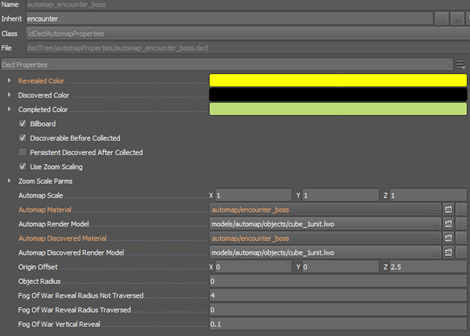
For Encounters, the designer must assign the corresponding AutomapProperties Decl to each individual entity or create a new info/null entityDef for Encounter Automap icons.
Properties
| Name | Description |
|---|---|
| Revealed Color | Color when the player reveals the icon. |
| Discovered Color | Color when the player discovers the icon. |
| Completed Color | Color when the player completes interacting with the icon |
| Billboard | Boolean for the icon to rotate towards the camera |
| Discoverable Before Collected | Boolean for whether or not the player can discover the icon before collecting it |
| Persistent Discovered After Collected | Boolean for whether or not the item remains discovered on future playthroughs |
| Use Zoom Scaling | Boolean whether the icon scales when zooming in/out on the Automap |
| Automap Scale | Controls the scale of the icon |
| Automap Material | Material for the icon on the automap |
| Automap Render Model | lwo for the model for the icon on the automap |
| Automap Discovered Material | Material for the discovered icon on the automap |
| Automap Discovered Render Model | lwo for the model for the discovered icon on the automap |
| Origin Offset | Offsets the origin of the icon |
| Object Radius | Scales the object’s radius |
| Fog of War Reveal Radius Not Traversed | Controls the Fog of War radius around the icon that touches the player’s Discovered radius |
| Fog of War Reveal Radius Traversed | Controls the Fog of War radius around the icon that touches the player’s Reveal radius |
| Fog of War Vertical Reveal | Controls the Fog of War vertical reveal (it’s low so players don’t reveal Automap icons when walking over them) |
UIdatagroup/progressioncategorydata Decl
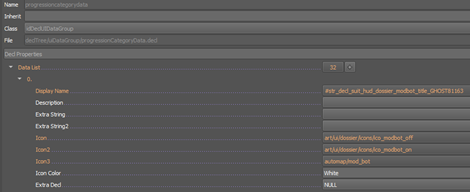
Controls the icons the Items Found section of the Automap
| Name | Description |
|---|---|
| Icon | Material that controls how the icon looks when "off" |
| Icon2 | Material that controls how the icon looks when "on" |
| Icon3 | Material for the icon in the Legend |
Automap Decls
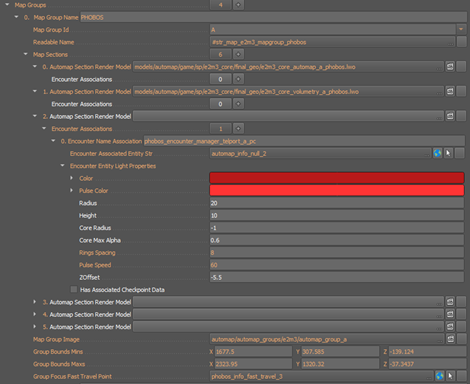
Each map has their own Automap decl (which inherits from the default); it should have the same name as the map
| Name | Description |
|---|---|
| Map Group Name | Text name for the Automap group name (for dev purposes) |
| Map Group ID | Letter order of the Automap Groups (A is first, then B, etc) |
| Readable Name | String for the player-facing name of the Automap Group |
| Map Group Image | Material for the preview image for each Map Group in the Automap |
| Group Bounds Mins/Maxs | Location bounds for the Automap (set by the artist) |
| Group Focus Fast Travel Point | When previewing the Map Group, it automatically focuses on the center of the Automap geo, but you can set a specific entity to be where the camera focuses on instead. (We used this feature in Mars Core because of how large the maps are and how much empty space there is between geo.) |
Map Sections
- Automap Section Render Model
- [0] the lwo for the Automap model
- [1] the lwo for the translucent volumes for the automap model
Encounter associations
| Name | Description |
|---|---|
| Encounter Name Association | The name of the encounter manager entity which all of the below properties track |
| Encounter Associated Entity Str | Other icons on the Automap use their entity’s placement, but because designers do not place the encounter manager in the center of the encounter space, a designer places a dummy entity (ex. info/null) that controls where the icon for the encounter appears on the Automap. |
Encounter Entity Light Properties
| Name | Description |
|---|---|
| Color | The color of the icon |
| Pulse Color | The color of the pulsing rings |
| Radius | The size of the radius of the encounter space |
| Height | The size of the height of the encounter space (so the colors either bleed or do not bleed through areas above and below the encounter icon) |
| Core Radius | The size of the central colored circle |
| Core Max Alpha | The Alpha of the central colored circle |
| Rings Spacing | The spacing of the rings |
| Pulse Speed | The pulse speed of the rings |
| ZOffset | The ZOffset of the Automap icon |
Level Markup
target/automap_group_unlock- A designer needs to add
target/automap_group_unlockentities to the map for each Automap Group. When the player crosses over to the next Map Group for the first time, the game needs to activate the corresponding entity to unlock that next Map Group.
- A designer needs to add
target/change_layer- Map Group Index
- Unlocks the number for the corresponding Map Group ID (Map Group Index 0 unlocks Map Group ID A, Map Group Index 1 unlocks Map Group ID B, etc)
- Map Group Index
Useful console commands
Enter find automap in the console to see a full list
| Command | Description |
|---|---|
Automap_Generate | generates an LWO model based on the existing nav mesh |
Automap_ReveallAll | Reveals all of the automap (untraversed) |
Automap_ReveallAllAsTraversed | Reveals all of the automap (traversed) |
Automap_RevealAllProgressionItemObjects | Reveals position of all progression items |
Automap_DiscoverAllProgressionItemObjects | Reveals what all of the progression items are |
Useful control cvars
Enter find automap in the console to see a full list
| CVar | Default value | Description |
|---|---|---|
Automap_deadzone | 0.2 | Controller joystick deadzone for automap pan |
Automap_fog_tile_min_height | 1.0 | Minimum height of fog of war tiles |
Automap_fog_tile_min_width | 1.0 | Minimum width of fog of war tiles |
Automap_maxPitchDegrees | 80.0 | Max degrees of pitch for automap |
Automap_maxZoom | 500 | Max distance for zooming in |
Automap_minPanSpeedModifier | 100 | Automap camera minimum pan speed modifier based on zoom |
Automap_minPitchDegrees | 1.0 | Min degrees of pitch for automap |
Automap_minZoom | 20.0 | Min distance for zooming in |
Automap_panSpeedController | 1.25 | How fast the Automap pans with controller |
Automap_panSpeedKeyboard | 1.25 | How fast the Automap pans with keyboard |
Automap_panSpeedMouse | 0.00125 | How fast the Automap pans with mouse |
Automap_rotatePitchYawRatio | 0.8 | Ratio between Automap pitch and yaw speed |
Automap_rotateSpeedController | 150 | How fast the Automap rotates with controller |
Automap_rotateSpeedMouse | 0.1 | How fast the Automap rotates with mouse |
Automap_zoomSpeedController | 500 | How fast the Automap zooms with controller |
Automap_zoomSpeedMouseDrag | 1.0 | How fast the Automap zooms with mouse drag |
Automap_zoomSpeedMouseScroll | 30.0 | How fast the Automap zooms with mouse scroll |