Material Editor
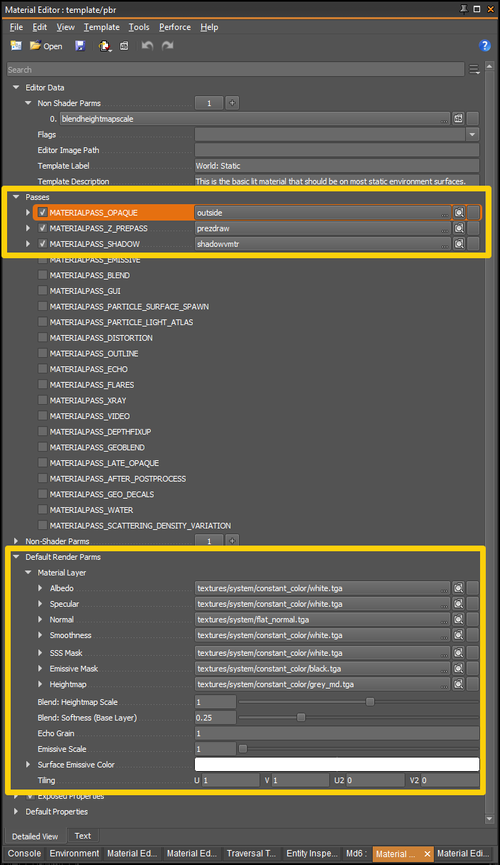
The Material Editor presents structured material data and makes information as explicit as possible to the user, allowing designers and artists to create and edit material data with as little overhead as possible. The goal is to reduce the the time required during optimization and troubleshooting, especially with regards to rendering passes.
Usage
Open a material decl
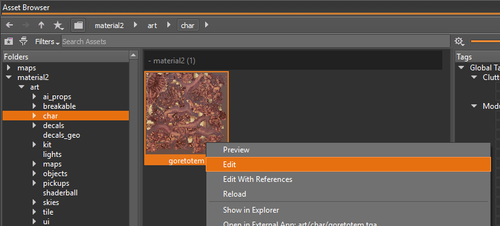
To open a material from the editor you can select the Edit or Inspect options from the Right-click context menu anywhere you see a material in idStudio – including the Asset Browser, Animated Model Editor, or Static Model Editor.
Create a material decl
Material Remapping
Material Templates
A Material Template defines the passes included in a material's shader and the default renderParms. The included shader passes will determine which Render Parms and Properties are displayed in the Normal View of the Material Editor. Material Templates allow skilled users to edit and customize individual render passes in the Material Editor, where previously they could only be defined in code.
A Material Template will also include a Template Label and Template Description which will be displayed when creating a new material.