FX Editor
The FX Editor is the primary tool used to create visual effects inside idStudio. The FX Editor allows you to combine particles, sounds, lights, and other effects into an FX decl, which can then be used in cinematics, MD6s, maps, and more.
For a fun tutorial that displays some uses of the FX Editor, check out the tutorial: Fun With Particle Effects
FX Editor Interface
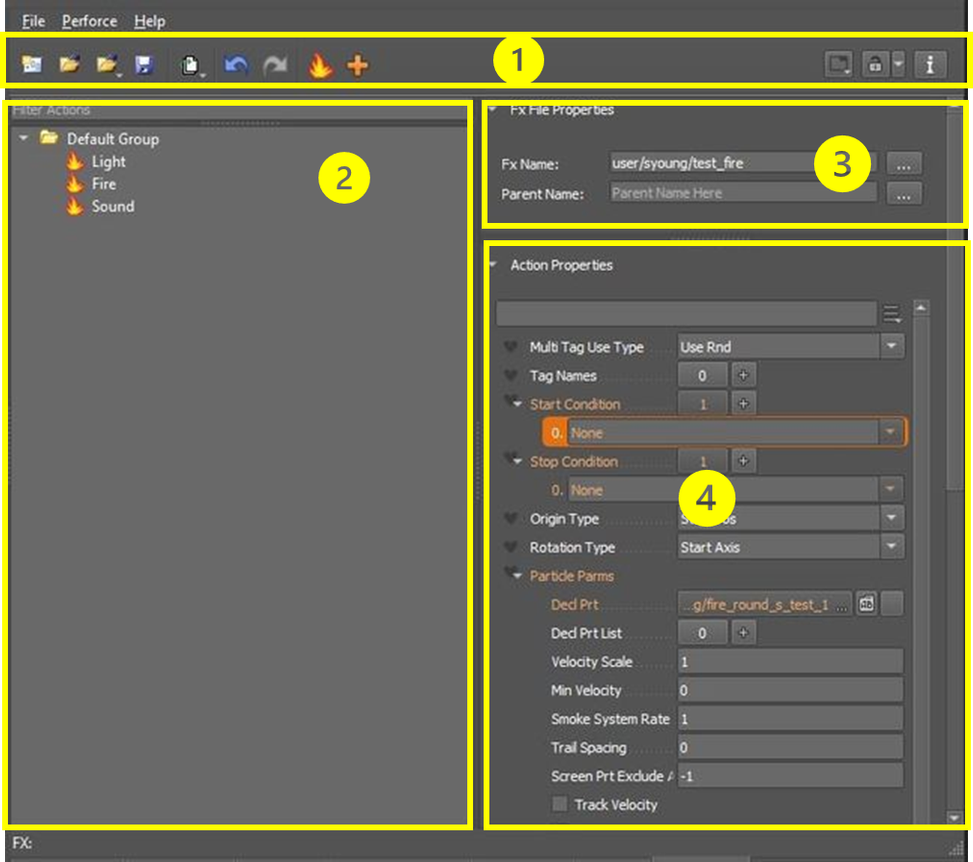
Toolbar
The toolbar includes main menus, commonly used commands (Save, Open, Open Recent, Undo, etc.), and layout options.
Actions Pane
The Actions Pane is where you will create Actions that are organized into Groups. Actions include, but are not limited to, particles, lights, sounds, models, other decls, and screen fx, that can be triggered. This pane also includes a search filter which can be useful when a decl contains numerous groups and actions.
File Properties Pane
The File Properties Pane is where you will set Action Properties, such as:
- Tag Names
- Start and Stop Conditions
- Origin and Rotation Types
- Transform and Rot Offset
- Duration and other properties.
This pane also includes a search filter for quicker access to properties.
Action Properties Pane
The Action Properties Pane displays the current loaded FX Decl name and parent.