Sub-Mesh Groups (in Animated Model Editor)
An MD6 Mesh can be composed of several meshes. On import, these meshes may be split programmatically into several sub-meshes (or surfaces) based upon a few criteria: vertex count, triangle count, materials, etc.
When a mesh is split, the individual surfaces are given an encoded name so that the name of each surface is unique. However, this can make it difficult for a user to understand, edit, and iterate with the meshes as their names are unclear and can change any time the MD6 is updated with new content.
A mesh group, as the name implies, is a group of sub-meshes that are logically combined into one unit although their underlying surfaces remain separate and unique.
Mesh groups are created automatically for any mesh that split programmatically on import, but they can also be explicitly specified in .MD6mesh so that we can logically combine related pieces together (such as all parts of a particular attachment or mod). Controlling mesh may be accomplished by specifying either the group name or the unique name of the individual surfaces.
Example: Chaingun Mesh
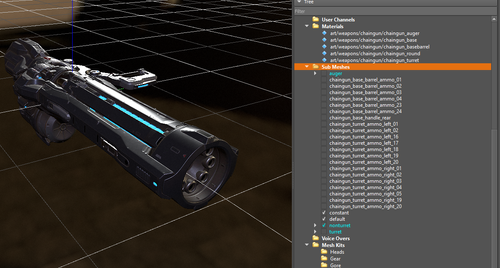
In the tree for the chaingun mesh, you will see 26 individual meshes listed. The meshes colored with white text are single unique surfaces. They are not explicitly grouped together with any other surface and they were not programmatically split on import.
The meshes colored with cyan text are grouped meshes.
Expanding the auger part in the tree and viewing the Submesh Properties will show that this part was split into two surfaces.
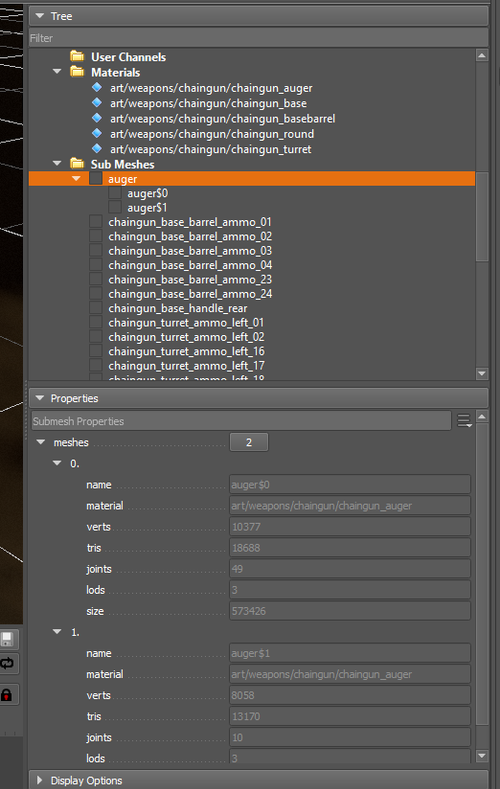
When this mesh was imported, this auger part was programmatically split and renamed as two unique physical surfaces: auger$0 and auger$. However, they remain grouped together as one logical surface named auger. This allows other data assets that need to reference the auger part to only list the part name as auger.
If in the future this part's surfaces change for any reason (adding or removing materials, geometry, etc.), the integrity of any existing data reference to the auger part remains intact and will work without modifications.