Create & Edit a Gore Container
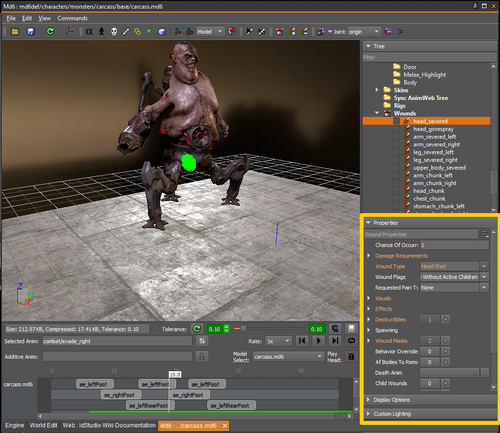
The Animated Model Editor includes functions for Gore Graph and GoreGUI, allowing users to define wounds and gibs with user-friendly controls and preview their work directly in the editor.
Dynamic events, such as glory kills, must still be previewed in engine.
Procedure
Step 1
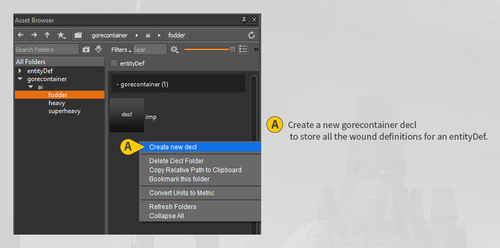
Determine if an appropriate gore container decl exists under game/base/gorecontainer.
If not, Right-click and select Create new decl.
The gore container will list the definitions of all the wounds available for an entityDef.
Step 2
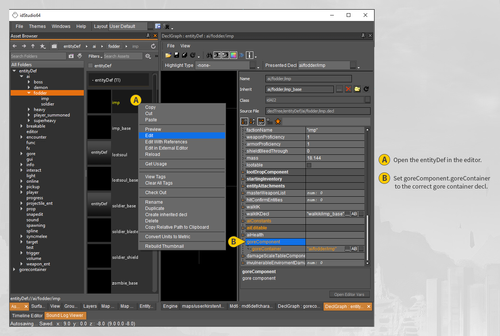
Find the EntityDef in Asset Browser under game/base/entityDef and open it in the editor by Right-clicking and selecting Edit.
Step 3
Make sure the goreComponent.goreContainer parameter is set to the correct gore container decl, then save.
Step 4
Load the correct MD6 in the Animated Model Editor.
Open an associated gore container by going to View → Load Gore.
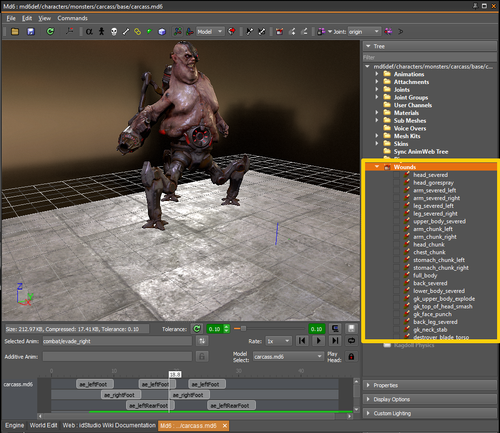
After the gore container loads, a default floor will load in the Preview, and the Wounds category in the Tree will populate with any existing wounds in the gore container.
Step 5
Preview existing wounds by toggling them on or off from the Wounds group in the Tree.
Effects, gibs, decals, wound meshes, and other wound components will all display in the preview window.
Step 6
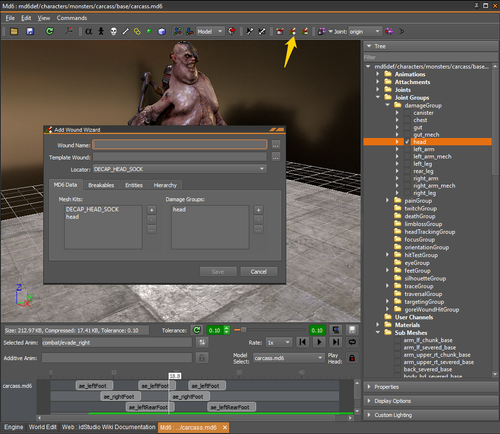
To create a new wound, multi-select any relevant tag joints, mesh kits, joint groups, _info attachments, or wounds and hit the Add Wound button on the toolbar.
Any multi-selected items will automatically populate the Locator, Mesh Kits, Damage Groups, and Child Wounds fields.
You must provide a Wound Name.
You can optionally add a Template Wound to provide default parameters.
The Breakables and Entities fields can be added from the wizard or can be added later.
Step 7
Edit existing wounds using the Properties section in the Animated Model Editor.
Drag-and-drop functionality allows you to populate certain fields with the correct tag joint, mesh kit, joint group, _info attachment, or child wound from the same MD6.